
JavaScript Debouncing & Throttling: Tối Ưu Hiệu Suất và Trải Nghiệm Người Dùng
Tìm hiểu debouncing và throttling trong JavaScript — hai kỹ thuật tối ưu hiệu suất không thể thiếu giúp kiểm soát tần suất thực thi hàm, giảm tải CPU và cải thiện trải nghiệm người dùng trên web.
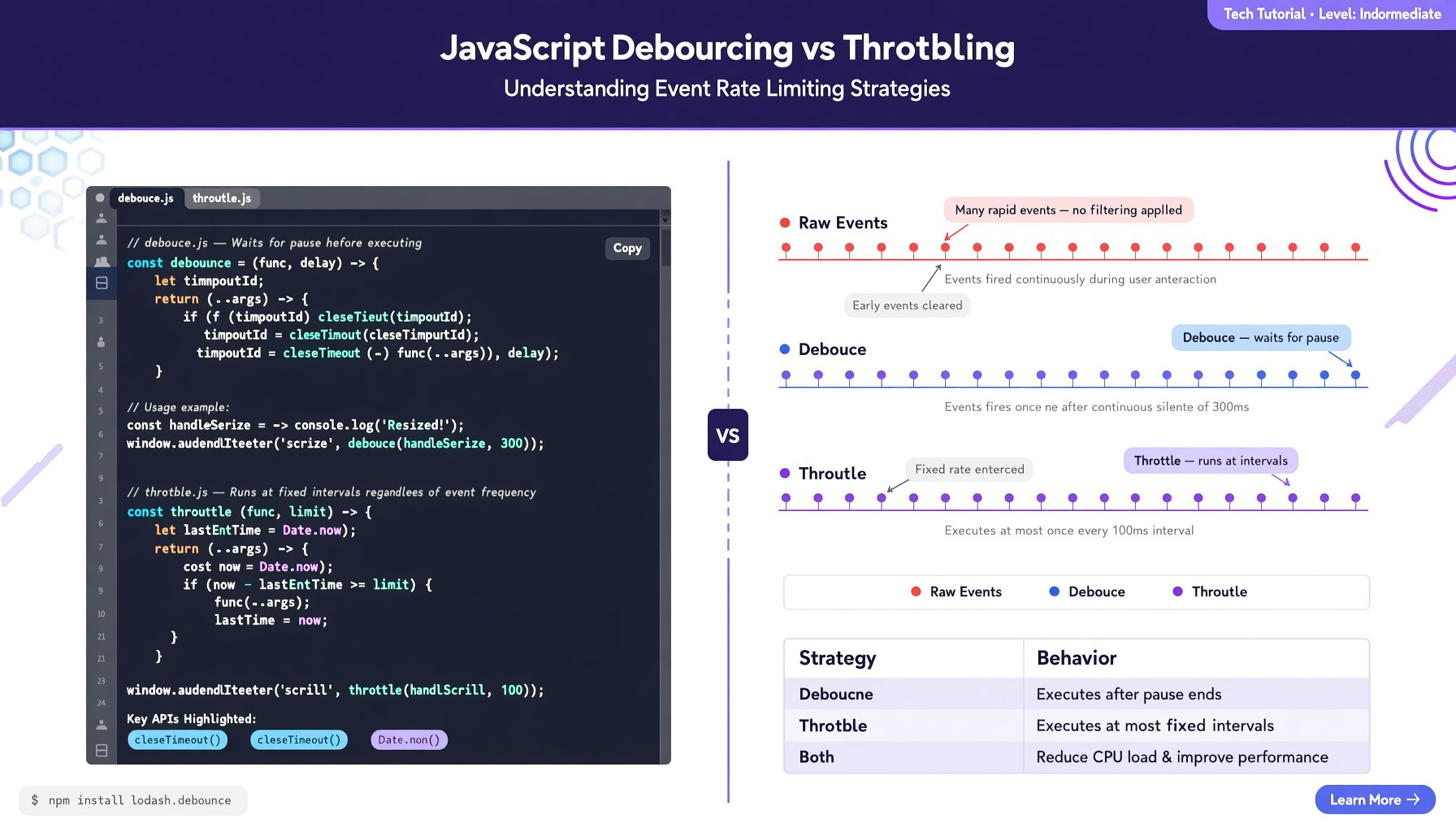
Debouncing và Throttling là hai kỹ thuật kiểm soát tần suất thực thi không thể thiếu trong JavaScript. Bất kỳ web developer nào từng xử lý sự kiện scroll, resize, hoặc input search đều biết rằng — nếu không kiểm soát, trình duyệt sẽ bị quá tải bởi hàng trăm lần gọi hàm mỗi giây.
Trong bài viết này, bạn sẽ hiểu rõ:
- Debounce là gì, Throttle là gì và sự khác biệt cốt lõi
- Cách tự tay implement từ phiên bản cơ bản đến nâng cao
- Khi nào dùng cái nào với ví dụ thực tế
- Các edge case và best practices cho production
- So sánh với Lodash và các thư viện phổ biến
1. Vấn Đề: Event Fires Quá Nhiều
Hãy nhìn vào đoạn code đơn giản này:
const searchInput = document.getElementById('search');
searchInput.addEventListener('input', (e) => {
  console.log('Gọi API tìm kiếm:', e.target.value);
  // fetch(`/api/search?q=${e.target.value}`)
});
Khi người dùng gõ “javascript” (12 ký tự), sự kiện input kích hoạt 12 lần — mỗi lần gõ một chữ. Nếu bạn gọi API trong đó, đó là 12 request chỉ trong 1-2 giây.
Với các sự kiện như scroll hoặc mousemove, con số có thể lên đến 60-100 lần/giây.
Debounce và Throttle giúp bạn giảm số lần đó xuống mức hợp lý — mà không làm mất trải nghiệm người dùng.
2. Debounce — “Đợi Xong Rồi Chạy”
Debounce trì hoãn việc thực thi một hàm cho đến khi một khoảng thời gian yên tĩnh trôi qua kể từ lần kích hoạt cuối cùng.
2.1. Debounce Cơ Bản
function debounce(func, delay) {
  let timeoutId;

  return function(...args) {
    clearTimeout(timeoutId);
    timeoutId = setTimeout(() => {
      func.apply(this, args);
    }, delay);
  };
}
Cách hoạt động:
- Khi sự kiện xảy ra,
setTimeoutđược đặt với thời giandelay - Nếu sự kiện xảy ra lần nữa trước khi
delaykết thúc →clearTimeoutxoá lần trước và đặt lạisetTimeoutmới - Hàm chỉ thực thi khi không có sự kiện mới nào trong
delayms
2.2. Ví Dụ Thực Tế: Search Autocomplete
const debouncedSearch = debounce(async (query) => {
  const results = await fetch(`/api/search?q=${query}`);
  showResults(await results.json());
}, 300);

searchInput.addEventListener('input', (e) => {
  debouncedSearch(e.target.value);
});
Giờ đây, khi người dùng gõ “javascript”, API chỉ được gọi một lần duy nhất — 300ms sau khi họ ngừng gõ.
2.3. Debounce Với Leading Option
Đôi khi bạn muốn hàm chạy ngay lần đầu tiên, rồi mới debounce các lần sau. Ví dụ: nút “Save” tránh spam click.
function debounce(func, delay, { leading = false } = {}) {
  let timeoutId;
  let isLeadingCalled = false;

  return function(...args) {
    if (leading && !isLeadingCalled) {
      func.apply(this, args);
      isLeadingCalled = true;
    }

    clearTimeout(timeoutId);
    timeoutId = setTimeout(() => {
      if (leading) {
        isLeadingCalled = false;
      } else {
        func.apply(this, args);
      }
    }, delay);
  };
}
3. Throttle — “Chạy Đều Đặn Theo Chu Kỳ”
Throttle đảm bảo một hàm chỉ chạy tối đa một lần trong một khoảng thời gian nhất định, bất kể nó được gọi bao nhiêu lần.
3.1. Throttle Cơ Bản (Dùng Timestamp)
function throttle(func, limit) {
  let lastCall = 0;

  return function(...args) {
    const now = Date.now();
    if (now - lastCall >= limit) {
      lastCall = now;
      func.apply(this, args);
    }
  };
}
3.2. Throttle Dùng setTimeout
function throttle(func, limit) {
  let isThrottled = false;

  return function(...args) {
    if (isThrottled) return;

    isThrottled = true;
    func.apply(this, args);

    setTimeout(() => {
      isThrottled = false;
    }, limit);
  };
}
3.3. Ví Dụ Thực Tế: Infinite Scroll
const throttledScroll = throttle(() => {
  const { scrollTop, scrollHeight, clientHeight } = document.documentElement;
  if (scrollTop + clientHeight >= scrollHeight - 100) {
    loadMoreContent();
  }
}, 200);

window.addEventListener('scroll', throttledScroll);
Không có throttle, sự kiện scroll kích hoạt hàng chục lần mỗi giây. Với limit: 200ms, hàm chỉ chạy tối đa 5 lần/giây — vừa đủ để UI responsive, vừa giảm tải CPU.
3.4. Throttle Với Trailing Call
Throttle cơ bản có thể “bỏ lỡ” lần gọi cuối. Trailing throttle đảm bảo lần cuối luôn được thực thi:
function throttle(func, limit) {
  let lastCall = 0;
  let timeoutId;

  return function(...args) {
    const now = Date.now();
    const remaining = limit - (now - lastCall);
    const context = this;

    clearTimeout(timeoutId);

    if (remaining <= 0) {
      lastCall = now;
      func.apply(context, args);
    } else {
      timeoutId = setTimeout(() => {
        lastCall = Date.now();
        func.apply(context, args);
      }, remaining);
    }
  };
}
4. Debounce vs Throttle: So Sánh Trực Quan
| Tiêu chí | Debounce | Throttle |
|---|---|---|
| Cơ chế | Đợi yên tĩnh rồi chạy | Chạy theo chu kỳ đều đặn |
| Số lần chạy | 1 lần sau khi kết thúc | Nhiều lần, cách đều nhau |
| Khi scroll liên tục 5s | Chạy 1 lần sau 5s | Chạy ~5-10 lần (tuỳ limit) |
| Khi gõ “hello” nhanh | Chạy 1 lần | Chạy 2-3 lần |
| Phù hợp | Autocomplete, validate | Scroll, resize, animation |
Minh Họa Bằng Code
// Giả lập gọi hàm liên tục
function simulateCalls(fn, label, times = 10, interval = 50) {
  console.log(`\n=== ${label} ===`);
  for (let i = 0; i < times; i++) {
    setTimeout(() => fn(i), i * interval);
  }
}

// Raw function
const rawFn = (i) => console.log(`Raw: ${i}`);

// Debounced
const debouncedFn = debounce((i) => console.log(`Debounced: ${i}`), 300);

// Throttled
const throttledFn = throttle((i) => console.log(`Throttled: ${i}`), 200);
Kết quả mong đợi:
- Raw: 0, 1, 2, 3, 4, 5, 6, 7, 8, 9 (cả 10 lần)
- Debounced: 9 (chỉ lần cuối, 300ms sau khi kết thúc)
- Throttled: 0, 2, 4, 6, 8 (5 lần, cách nhau 200ms)
5. Ứng Dụng Thực Tế Chi Tiết
5.1. AutoSave Form
const saveForm = debounce(async () => {
  const formData = new FormData(document.getElementById('myForm'));
  await fetch('/api/draft', {
    method: 'POST',
    body: formData
  });
  console.log('Draft saved at', new Date().toLocaleTimeString());
}, 1000);

// Mỗi lần người dùng thay đổi form, auto-save được lên lịch lại
document.getElementById('myForm').addEventListener('input', saveForm);
5.2. Resize Handler — Cập Nhật UI
const updateLayout = throttle(() => {
  const width = window.innerWidth;
  if (width < 768) {
    activateMobileLayout();
  } else if (width < 1024) {
    activateTabletLayout();
  } else {
    activateDesktopLayout();
  }
}, 100);

window.addEventListener('resize', updateLayout);
5.3. Button Chống Spam Click
const handleSubmit = debounce(async () => {
  const btn = document.getElementById('submitBtn');
  btn.disabled = true;
  btn.textContent = 'Đang xử lý...';

  try {
    await fetch('/api/submit', { method: 'POST' });
    alert('Thành công!');
  } finally {
    btn.disabled = false;
    btn.textContent = 'Gửi';
  }
}, 500, { leading: true });

document.getElementById('submitBtn').addEventListener('click', handleSubmit);
5.4. Analytics Tracking
// Gửi sự kiện scroll tracking, nhưng không quá 1 lần mỗi 2 giây
const trackScroll = throttle(() => {
  const scrollDepth = Math.round(
    (window.scrollY + window.innerHeight) / document.documentElement.scrollHeight * 100
  );
  // Gửi depth lên analytics
  console.log(`Scroll depth: ${scrollDepth}%`);
}, 2000);

window.addEventListener('scroll', trackScroll);
6. Debounce/Throttle với Lodash (Production Ready)
Trong dự án thực tế, bạn có thể dùng Lodash — thư viện đã được tối ưu kỹ:
// Cài đặt
// npm install lodash-es

import { debounce, throttle } from 'lodash-es';

// Debounce với đầy đủ options
const search = debounce(
  async (query) => { /* fetch */ },
  300,
  { leading: false, trailing: true, maxWait: 1000 }
);

// Throttle với options
const scrollHandler = throttle(
  () => { /* handle scroll */ },
  200,
  { leading: true, trailing: true }
);

// Hủy debounce khi component unmount (React)
useEffect(() => {
  return () => search.cancel();
}, []);
Các options quan trọng của Lodash:
| Option | Mô tả |
|---|---|
leading | Chạy ngay lần đầu tiên |
trailing | Chạy lần cuối sau khi kết thúc |
maxWait | Thời gian tối đa chờ (debounce) — đảm bảo hàm chạy ít nhất mỗi maxWait ms |
7. Edge Cases và Best Practices
7.1. Giữ this Context
Luôn dùng func.apply(this, args) thay vì func(args) để giữ đúng ngữ cảnh this:
const obj = {
  name: 'MyComponent',
  log() { console.log(this.name); }
};

// ✅ Đúng
obj.log = debounce(obj.log, 100); // giữ this

// ❌ Sai
obj.log = debounce(() => obj.log(), 100); // mất this
7.2. Xoá bỏ Debounce Khi Component Unmount
Trong React/Vue, luôn huỷ debounce khi component unmount để tránh memory leak:
// React
useEffect(() => {
  const handleSearch = debounce((q) => fetchResults(q), 300);
  searchInput.addEventListener('input', handleSearch);
  return () => {
    searchInput.removeEventListener('input', handleSearch);
    handleSearch.cancel();
  };
}, []);
7.3. Không Phải Lúc Nào Cũng Cần
Debounce và throttle không phải là cây đũa thần. Cân nhắc:
requestAnimationFramecó thể thay thế throttle cho animation (60fps)CSSwill-change“ vàpointer-events: nonegiảm tải GPU- Event delegation giảm số lượng listener
7.4. Debugging Debounce/Throttle
Khi debug, nhớ rằng debounce trì hoãn — nếu bạn set breakpoint, timeout cũng bị trì hoãn. Dùng console.log hoặc thêm flag:
function debounce(func, delay, { debug = false } = {}) {
  let timeoutId;
  return function(...args) {
    if (debug) console.log('Debounce called, resetting timer');
    clearTimeout(timeoutId);
    timeoutId = setTimeout(() => {
      if (debug) console.log('Debounce executing');
      func.apply(this, args);
    }, delay);
  };
}
8. Performance So Sánh
Giả sử một sự kiện scroll kích hoạt 60 lần/giây trong 5 giây (300 lần):
| Kỹ thuật | Số lần thực thi | Mức giảm |
|---|---|---|
| Không kiểm soát | 300 | — |
| Throttle 100ms | ~50 | 83% |
| Throttle 200ms | ~25 | 92% |
| Throttle 500ms | ~10 | 97% |
| Debounce 300ms | 1 | 99.7% |
Trong ứng dụng thực tế, kết hợp với passive event listeners:
// passive: true cho phép browser không chờ preventDefault
window.addEventListener('scroll', handler, { passive: true });
9. Tổng Kết
| Kỹ thuật | Từ khoá | Use case |
|---|---|---|
| Debounce | Đợi rồi chạy | Search, validate, auto-save |
| Throttle | Chạy đều đặn | Scroll, resize, tracking |
| Debounce (leading) | Chạy ngay, đợi sau | Button anti-spam |
| Throttle (trailing) | Chạy đều, bắt kịp cuối | Animation, real-time UI |
Code Mẫu Hoàn Chỉnh
// Debounce — tự viết
function debounce(func, delay = 300, { leading = false } = {}) {
  let timeoutId;
  let leadingCalled = false;

  const debounced = function(...args) {
    if (leading && !leadingCalled) {
      func.apply(this, args);
      leadingCalled = true;
    }
    clearTimeout(timeoutId);
    timeoutId = setTimeout(() => {
      if (leading) leadingCalled = false;
      else func.apply(this, args);
    }, delay);
  };

  debounced.cancel = () => clearTimeout(timeoutId);
  return debounced;
}

// Throttle — tự viết
function throttle(func, limit = 200) {
  let inThrottle = false;
  let lastArgs, lastContext;

  const throttled = function(...args) {
    if (inThrottle) {
      lastArgs = args;
      lastContext = this;
      return;
    }
    func.apply(this, args);
    inThrottle = true;
    setTimeout(() => {
      inThrottle = false;
      if (lastArgs) {
        func.apply(lastContext, lastArgs);
        lastArgs = lastContext = null;
      }
    }, limit);
  };

  throttled.cancel = () => { inThrottle = false; lastArgs = null; };
  return throttled;
}
Hãy nhớ: không phải sự kiện nào cũng cần debounce/throttle. Chỉ áp dụng khi bạn thực sự gặp vấn đề về hiệu suất hoặc gọi API quá nhiều. Và khi áp dụng, hãy chọn đúng kỹ thuật — debounce cho “kết quả cuối cùng”, throttle cho “cập nhật liên tục”.
Bạn đã từng gặp tình huống scroll lag hoặc search bị chậm vì gọi API quá nhiều? Hãy thử áp dụng debounce và throttle ngay hôm nay!